How to make a Telegram video sticker from your own video
Telegram video stickers are short WEBM clips with a transparent background. You can make one by hand with ffmpeg and the @Stickers bot, or let a bot do the cut-out for you. Both ways are below.
What Telegram accepts
- WEBM container, VP9 codec, no audio track.
- One side exactly 512 px, the other 512 px or less.
- Up to 3 seconds, up to 30 frames per second, ideally looped.
- File size up to 256 KB.
Source: core.telegram.org/stickers.
The manual way (ffmpeg)
This keeps the original background. Cut 3 seconds, scale to 512 and encode VP9:
ffmpeg -ss 0 -t 3 -i input.mp4 -an \
  -vf "fps=30,scale='if(gt(iw,ih),512,-2)':'if(gt(iw,ih),-2,512)'" \
  -c:v libvpx-vp9 -pix_fmt yuva420p -b:v 400k sticker.webm
If the file is over 256 KB, lower -b:v (300k, 200k) and encode again. Then open @Stickers, send /newvideo, give the pack a name and upload sticker.webm with an emoji.
A transparent background is the hard part: you need a mask for every frame. Video editors can do it with rotoscoping, which takes a while for a 3-second clip.
The fast way (a bot)
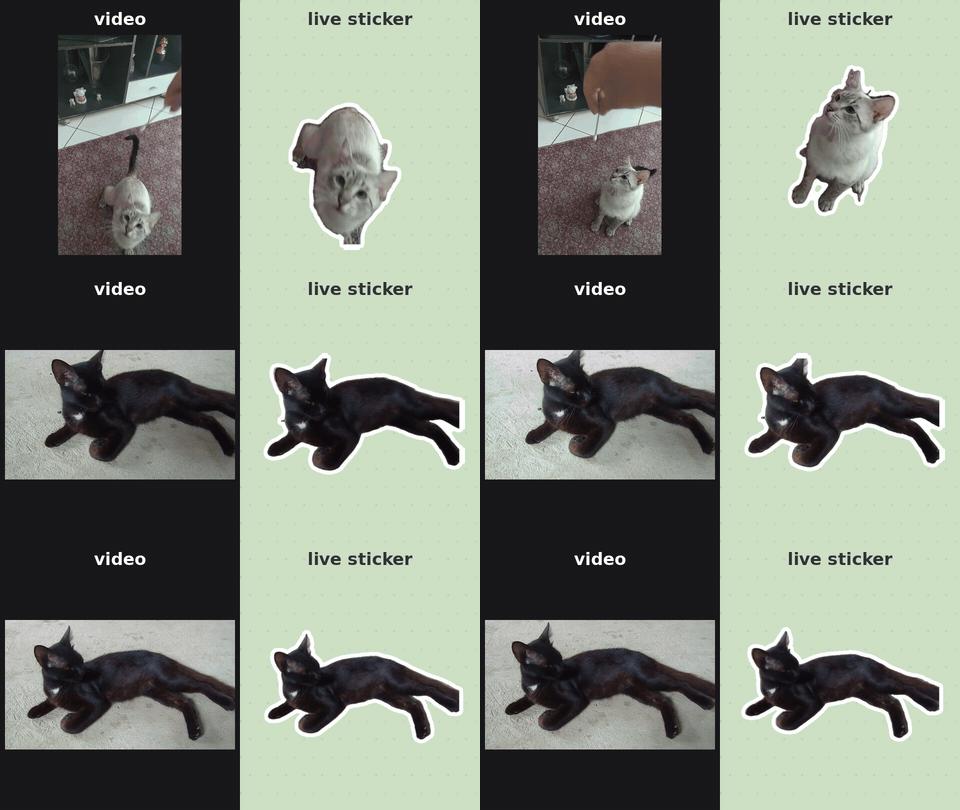
Send the video to @WigglePackBot. It removes the background from every frame, adds a white outline, fits the 256 KB limit and puts the sticker into your own pack. It takes about 30 seconds. Round video messages and GIFs work too; photos become static stickers.
Best results: one subject, whole body in frame, plain floor or wall, 1 to 3 seconds of motion. Grass, cushions and hands in the shot make the cut-out messy.
The first 3 live stickers are free, static stickers from photos are always free. More live stickers cost 50 Telegram Stars for 10.
More examples: Wiggle showcase.
More guides: remove the background · add text · en español · em português · по-русски
Open @WigglePackBot in Telegram
3 live stickers free · no sign-up · works in any Telegram app
No ffmpeg at hand? Free in-browser converter: video or GIF → Telegram sticker WEBM / emoji, nothing is uploaded.