How to remove the background from a video for a Telegram sticker
A Telegram video sticker gets a transparent background only if every frame of the WEBM has an alpha mask. There are three ways to get one: a green screen and ffmpeg's chromakey filter, an AI cut-out of each frame, or a bot that does the cut-out for you. All three are below, with commands we ran.
1. Shot on a green screen: chromakey
If the subject stands in front of a flat green background, ffmpeg removes it by color:
ffmpeg -ss 0 -t 3 -i input.mp4 -an \
  -vf "fps=30,chromakey=0x00FF00:0.15:0.05,scale='if(gt(iw,ih),512,-2)':'if(gt(iw,ih),-2,512)',format=yuva420p" \
  -c:v libvpx-vp9 -pix_fmt yuva420p -auto-alt-ref 0 -b:v 400k sticker.webm
0x00FF00 is the key color, 0.15 is how close a pixel has to be to count as background, 0.05 softens the edge. If green is left around the subject, raise 0.15 a little. For a blue screen use 0x0000FF.
2. Any background: AI cut-out per frame
A normal video of a pet on the floor needs a mask for every frame. The free rembg tool makes one: split the clip into frames, cut out each frame, glue them back with transparency.
pip install "rembg[cpu,cli]"
mkdir frames cut
ffmpeg -ss 0 -t 3 -i input.mp4 \
  -vf "fps=30,scale='if(gt(iw,ih),512,-2)':'if(gt(iw,ih),-2,512)'" frames/%03d.png
rembg p -m u2netp frames cut
ffmpeg -framerate 30 -i cut/%03d.png \
  -c:v libvpx-vp9 -pix_fmt yuva420p -auto-alt-ref 0 -b:v 400k sticker.webm
u2netp is the small, fast rembg model. On our 16-core server 90 frames took under 2 minutes, model loading included. Bigger models (isnet-general-use, birefnet) give cleaner fur edges and take several times longer. The edge can flicker from frame to frame, because each frame is cut on its own.
Then open @Stickers, send /newvideo, name the pack and upload sticker.webm with an emoji.
3. No install: a bot
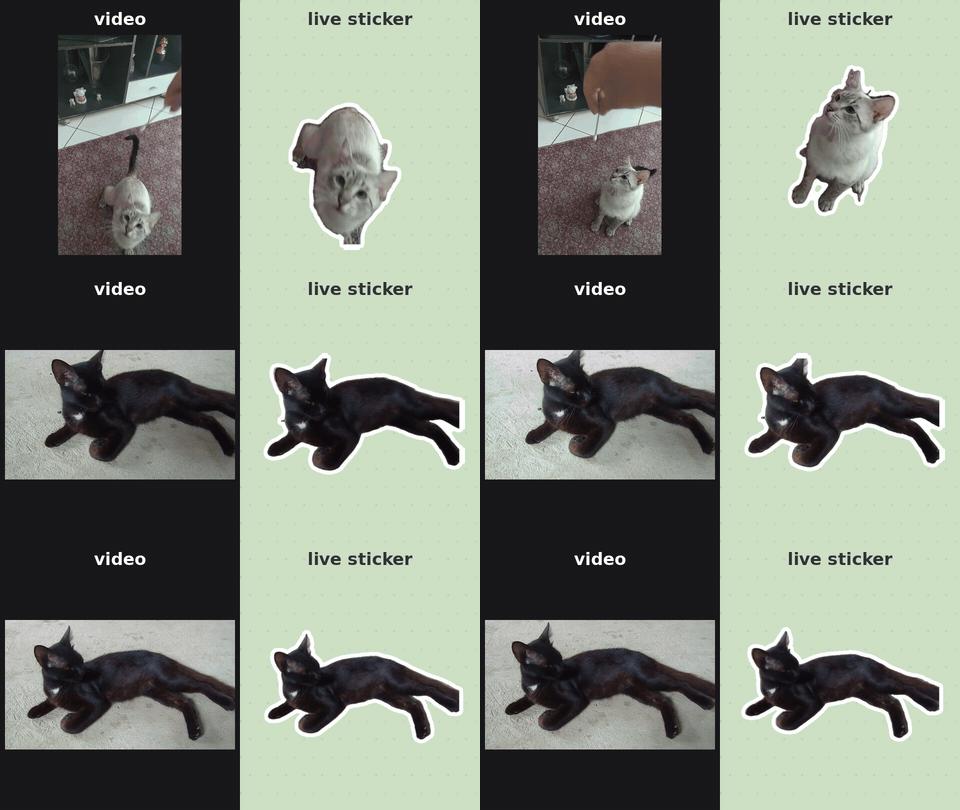
Send the video to @WigglePackBot. It cuts out every frame, smooths the edge between frames, adds a white outline, fits the file under 256 KB and adds the sticker to your own pack in about 30 seconds. Round video messages and GIFs work too.
It works best with one subject, whole body in frame, a plain floor or wall and 1 to 3 seconds of motion. Grass, cushions and hands in the shot make the cut-out messy.
The first 3 live stickers are free, then 10 for 50 Telegram Stars. Static stickers from photos are always free.
→ Remove the background from a video
FAQ
Can Telegram remove the background from a video sticker itself?
The built-in Sticker Editor cuts out the subject from photos. For a video sticker the transparency has to be in the WEBM file already: make it with chromakey, rembg or a bot such as @WigglePackBot, then upload it through @Stickers.
Which ffmpeg settings keep the transparency?
Encode with -c:v libvpx-vp9 -pix_fmt yuva420p. The "a" in yuva420p is the alpha channel; plain yuv420p throws it away and the background turns black.
My sticker looks black where it should be transparent. Why?
Usually the file is fine and the preview is wrong: ffmpeg's built-in VP9 decoder ignores alpha. Decode with -c:v libvpx-vp9 placed before -i, or just upload the file to @Stickers and look at it in Telegram.
How do I get under 256 KB?
Lower the bitrate (-b:v 300k, then 200k), cut the clip to 2 seconds or drop to 24 fps. A cut-out subject on a transparent background compresses better than the full frame.
More guides: make a video sticker · add text · examples.
Open @WigglePackBot in Telegram
3 live stickers free · no sign-up · works in any Telegram app
No ffmpeg at hand? Free in-browser converter: video or GIF → Telegram sticker WEBM / emoji, nothing is uploaded.